This is a short instruction to enable 2 finger scrolling on the touchpad of the Acer 1825:
create a script and open it with an editor
1 2 3 | touch touchpad.run gedit touchpad.run |
copy and paste the following lines into the script
1 2 3 4 5 6 7 8 9 10 11 12 13 14 15 16 17 18 19 20 21 22 23 24 25 26 27 28 29 | #!/bin/sh # # Use xinput --list-props "SynPS/2 Synaptics TouchPad" to extract data # sleep 10 #is necessary to have all modules load before the script runs # Set multi-touch emulation parameters xinput set-int-prop "SynPS/2 Synaptics TouchPad" "Synaptics Two-Finger Pressure" 32 10 xinput set-int-prop "SynPS/2 Synaptics TouchPad" "Synaptics Two-Finger Width" 32 8 xinput set-int-prop "SynPS/2 Synaptics TouchPad" "Two-Finger Scrolling" 8 1 xinput set-int-prop "SynPS/2 Synaptics TouchPad" "Synaptics Two-Finger Scrolling" 8 1 1 # Disable edge scrolling xinput set-int-prop "SynPS/2 Synaptics TouchPad" "Synaptics Edge Scrolling" 8 0 0 0 # This will make cursor not to jump if you have two fingers on the touchpad and you list one # (which you usually do after two-finger scrolling) xinput set-int-prop "SynPS/2 Synaptics TouchPad" "Synaptics Jumpy Cursor Threshold" 32 110 |
save the script and enable following permissons:
1 | chmod +x touchpad.run |
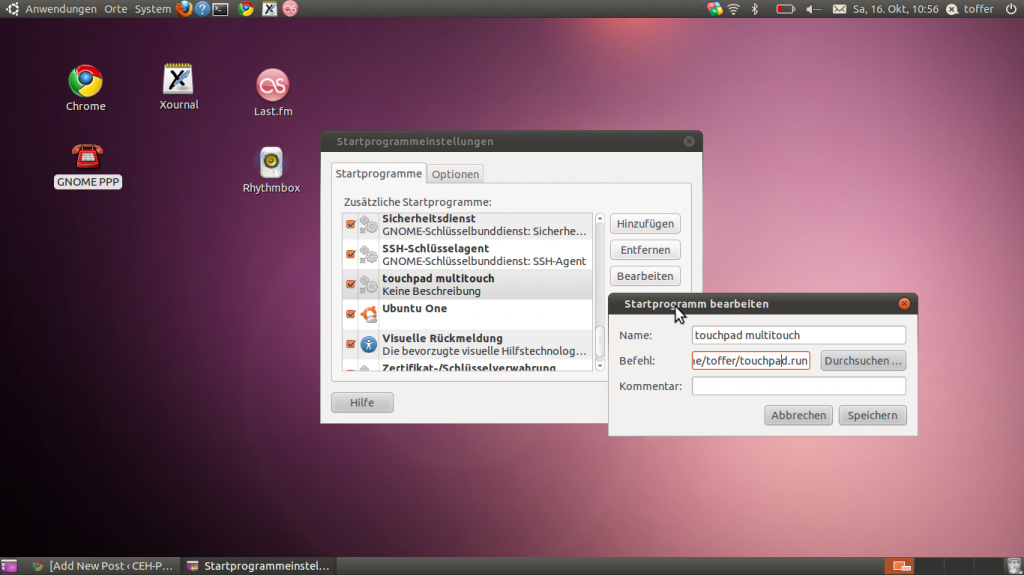
Last step you need to add the script to the autostart programs:
System–>preferences->startprograms
#!/bin/sh
#
# Use xinput –list-props “SynPS/2 Synaptics TouchPad” to extract data
#
sleep 10 #is necessary to have all modules load before the script runs
# Set multi-touch emulation parameters
xinput set-int-prop “SynPS/2 Synaptics TouchPad” “Synaptics Two-Finger Pressure” 32 10
xinput set-int-prop “SynPS/2 Synaptics TouchPad” “Synaptics Two-Finger Width” 32 8
xinput set-int-prop “SynPS/2 Synaptics TouchPad” “Two-Finger Scrolling” 8 1
xinput set-int-prop “SynPS/2 Synaptics TouchPad” “Synaptics Two-Finger Scrolling” 8 1 1
# Disable edge scrolling
xinput set-int-prop “SynPS/2 Synaptics TouchPad” “Synaptics Edge Scrolling” 8 0 0 0
# This will make cursor not to jump if you have two fingers on the touchpad and you list one
# (which you usually do after two-finger scrolling)
xinput set-int-prop “SynPS/2 Synaptics TouchPad” “Synaptics Jumpy Cursor Threshold” 32 110
Then reboot and you should be able to scroll with two fingers.
thanks a lot!
Not working!
OS: Linux Mint 10 (=Ubuntu 10.10)
Kernel: 2.6.35-22
After the script is startet neither the “normal” scroll (right side of touchscreen) nor the multitouch works.
Just double checked the script – it’s complete & set +x
Btw – why the
[code]touch touchpad.run[/code]
the 2nd step (gedit) is enough to create the (new) document.
Hey I am a bit confused,
it is working for you or not?
with touch and gedit you are right, I wanted to make clear, that you need to create this file.
what to you mean with & set +x?
If you have problems that the script sometimes works after startup, sometimes not increase the sleep time
Hoi
I mean it is not working.
After running the script neither the multitouch nor the normal side-scroll is working. So i removed the script from startup menu fopr now.
set +x
I mean the script is set as executable, as described in your HowTo.
My PC is absoloutly freshly set up – no changes done yet.
Oh – and no updates so far. I’m doing that now. Maybe that makes a difference?
You do have the 1825ptz, don’t you? With Ubuntu 10.10?
So if the script works for you, it’s quase impossible NOT to work on mine, eh?
Yes I have Ubuntu 10.10 64Bit but a Acer1825PT not PTZ, but the touchpad should be the same.
Change the sleep 10 to sleep 15 and check again!
Sleep time changed to 20 – no difference (not working)
OS updates are installed.
Yet – i run the 32bit version. Didn’t even know it’s a 64bit Processor.
Guess i’ll have a look at the 64bit version the next days. For now i allready spent way too much time trying to fix this essentiall missing feature.
I just gave my “old” Fujitsu U9200 to a friend – and i realy miss the multitouch badly…
edit: of course i’m referring to the touchpad, not the screen!
sorry man doesn’t work 🙁
if you give me more info, I could maybe help you.
Is this extendable? do you think we can get rotation and such working to? I heard of touchegg – supposed to help with this sort of thing